Buying a Carplaygo unit feels weirdly simple at first.
You see the photos. Big screen. CarPlay and Android Auto. No complicated install. Just stick it on the dash, plug it in, done. And then you open the product page and realize there are… a bunch of models. Similar names. Slightly different specs. Different mounts. Different screen sizes. Some claim “wireless” but you still see cables in the pictures. Classic.
So this guide is here to do the boring part for you. The part where you match the right model to your car, your commute, and how much you care about audio, screen brightness, and not having to fiddle with stuff every morning.
I’m going to keep it practical. Who each model is for. What’s worth paying extra for. And what you can ignore.
Quick reality check before you buy
A Carplaygo style portable screen is not the same thing as a factory head unit upgrade.
It’s basically an external display that runs CarPlay or Android Auto and then sends audio to your car in one of a few ways.
Usually one of these:
- AUX cable from the unit to your car’s AUX input (best quality if your car has AUX).
- FM transmitter broadcasting to your car radio (works in older cars, quality depends on interference).
- Bluetooth (sometimes direct to the car, sometimes via the unit depending on model and your setup).
That means your experience depends on your car too, not just the screen.
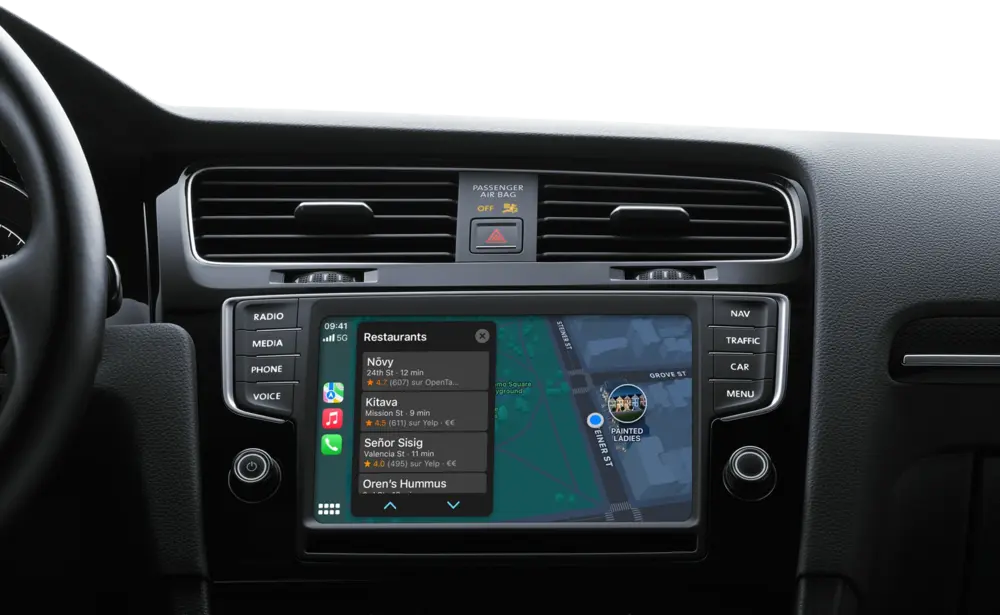
Also. Screen placement matters more than people think. If your dash is heavily curved, textured, or you have little room between the wheel and vents, the “best” model on paper can still be annoying day to day.
Ok. With that out of the way.
The 3 things that should decide your model
1) Screen size and readability (not just “bigger is better”)
Bigger screens are nice, sure. But bigger also means:
- more glare if your windshield throws light at it
- more blockage of vents or controls
- more mount wobble on rough roads
- more obvious cable mess unless you plan it
If you drive a compact car, a mid sized screen is usually the sweet spot. If you drive an SUV or a truck and sit farther from the dash, you’ll probably appreciate the larger panel.
2) Wireless vs wired CarPlay/Android Auto
Wired is boring but stable. Wireless is convenient but sometimes flaky depending on your phone, your car’s Bluetooth environment, and how the unit is built.
If you do lots of short trips, wireless is a big quality of life upgrade. If you do long drives and you hate reconnect issues, you might actually prefer wired.
And either way. You will still probably run a power cable. Most portable units need constant power. So the cleanest setup is usually: power hidden, CarPlay wireless.
3) Audio routing (this is where people get disappointed)
If your car has AUX input, prioritize a model/setup that lets you use it cleanly. AUX usually sounds better and avoids FM static.
If you have no AUX and you live in a dense city with crowded FM stations, FM transmitters can be a pain. Not unusable. Just one of those things where you’ll find yourself changing frequencies more often than you want.
So, when choosing, ask yourself: How will audio get into my speakers without hassle?
If you’re not sure, don’t guess. Go check your center console and confirm if you have AUX.
Carplaygo lineup in 2026 (how to think about it)
Carplaygo tends to sell variations of the same core idea:
- portable CarPlay/Android Auto display
- different screen sizes (commonly around 7 inch, 9 inch, 10 inch range)
- different mount styles (suction vs adhesive vs heavier “stand” style)
- sometimes “Pro” versions that add better brightness, better wireless stability, extra inputs, or upgraded audio options
- sometimes camera bundles (rear camera especially)
Even if your exact model name differs slightly on the listing. You can still pick correctly by matching it to one of the profiles below.
So I’m going to group the buyer decision into model types.
Model Type A: The compact screen (best for small dashboards)
Buy this if
- you drive a smaller car (hatchback, sedan, older compact)
- you want something that doesn’t dominate your dash
- you want the easiest “set it and forget it” placement
- you care more about function than looking like a Tesla
Why it’s the safest pick
A smaller screen usually means fewer mounting issues. Less wobble. Less vent blockage. Less glare simply because it’s easier to position.
Also, if you are the type of person who parks outdoors a lot, smaller units are easier to remove quickly and stash. That matters. Even if you don’t want to think about it.
What to look for in the listing
- IPS display (better viewing angles)
- decent brightness rating (if they mention nits, higher is better, but many listings don’t)
- physical buttons or a reliable on screen home button (touch only can be annoying while driving)
- a mount that looks stable on textured dashboards
Who should skip it
If you sit far from the dash (big SUV, truck) or you regularly use split screen mapping and music controls and you want bigger tap targets. You’ll end up wishing you went larger.
Model Type B: The mid size “sweet spot” (most people should buy this)
Buy this if
- you want a screen that feels modern but still fits most cars
- you use maps constantly
- you share the car with someone else and need simple, consistent use
- you want wireless CarPlay/Android Auto but still care about stability
This is the size category that tends to feel right in real driving. Big enough that Apple Maps or Google Maps is comfortable. Small enough that it’s not ridiculous on the dash.
What usually makes the “mid size Pro” worth it
In 2026, the difference between a basic mid size and a “Pro” mid size usually comes down to:
- brighter screen coating and better anti glare
- faster boot and faster reconnection
- more reliable wireless connection
- better microphone for calls (this is a sneaky one, and it matters)
If you take calls in the car weekly, don’t cheap out on mic quality. A bad mic turns every call into “can you hear me now” and you’ll stop using it.
Who should skip it
If you know you want a big screen. Not “maybe”. If you know. Then stop hesitating and go big. Because you’ll just upgrade later.
Model Type C: The large display (best for SUVs, trucks, and road trips)
Buy this if
- you drive a larger vehicle and sit farther from the dash
- you do a lot of highway driving or delivery driving
- you want the easiest glanceable navigation
- you like the idea of a floating tablet style screen
Large screens shine for navigation. Lane guidance, exits, quick route overviews. And in CarPlay, bigger screens also mean less “miss taps” when you’re trying to hit a tiny icon.
What can go wrong with big screens
- it can block vents and hazard buttons
- it can look awkward on a shallow dashboard
- it can wobble if the mount is weak
- glare can be worse, because the screen is physically larger
So if you buy the big one, take mounting seriously. If the listing includes a sturdier mount option, it’s often worth it.
Best pairing
Large screen + wireless CarPlay + hidden power cable is the “nice” setup. It feels integrated enough that you stop thinking about it.
Model Type D: The rear camera bundle (best for older cars with bad visibility)
Some Carplaygo models come bundled with a backup camera. Sometimes wired. Sometimes a “wireless” camera that still needs power, so it’s wireless-ish.
Buy this if
- your car doesn’t have a backup camera
- your rear visibility is bad (tinted windows, high trunk line, cargo van)
- you parallel park a lot
- you want one purchase, one system
Hard truth about backup cameras on portable units
The camera experience depends heavily on:
- camera quality (night performance, dynamic range)
- install quality (cable routing, power source)
- how quickly the screen switches when you go into reverse
If you’re not going to run wires cleanly, you might hate the whole thing. If you can do a neat install or pay someone to do it, it can be a real upgrade.
What to look for
- camera rated for night use
- waterproof rating (most are, but check)
- a proper reverse trigger wire or clear instructions on switching modes
- enough cable length for your vehicle type
Model Type E: The “budget basic” (only if your expectations are realistic)
This is the cheaper end. Smaller screen, fewer extras, often more reliance on FM audio.
Buy this if
- you just want maps and music in an older car
- you don’t care about perfect audio
- you’re okay with a more “gadgety” feel
Don’t buy this if
You are picky. About anything. Seriously.
If you’re picky about call quality, fast reconnection, screen brightness in sunlight, or audio clarity. The cheapest option tends to disappoint. Not always. But often enough that it’s a pattern.
Which Carplaygo model should you pick? My practical cheat sheet
Use this like a quick quiz.
Pick the compact model if…
- your dash space is limited
- you want minimal obstruction
- you remove the unit often (parking in public)
- you mostly care about navigation and basic playback
Pick the mid size model if…
- you want the best “fits almost every car” option
- you want easier touch targets but not a huge screen
- you share the car and want a simple daily experience
- you want the least regret purchase
Pick the large model if…
- you drive an SUV/truck
- you do long road trips
- you want navigation to be super glanceable
- you want the closest feel to a modern infotainment screen
Pick the camera bundle if…
- your car has no camera
- safety and parking convenience matter to you
- you are willing to install it properly
Pick the budget model if…
- your only goal is to get CarPlay or Android Auto working
- you accept compromises
- you are mainly using it for short trips
The options that matter (and the ones that don’t)

Here’s where people get stuck comparing listings for hours. So let’s simplify.
Prioritize these features
Wireless CarPlay/Android Auto (if you do lots of short drives)
It’s hard to go back once you get used to hopping in and having maps show up without plugging in.
Screen brightness and anti glare
If you drive in bright sun, a dim screen is miserable. It turns into a mirror.
Mount stability
Wobble makes the whole product feel cheap even if the screen is fine. And it’s distracting.
Audio output options
If you have AUX, you want to use it. If you don’t, make sure FM is decent or Bluetooth routing is supported in a way that fits your car.
Boot and reconnect speed
This is underrated. Slow boot means you’re already halfway down the road before maps appear. Not fun.
You can ignore these most of the time
Huge spec lists that don’t affect CarPlay
A lot of portable units advertise CPU, RAM, random features. For CarPlay and Android Auto, your phone is doing most of the work. The unit just needs to be stable.
Overhyped “HD audio” claims
Your actual bottleneck is usually the transport method into the car speakers, not the marketing text.
Fancy UI skins
If you use CarPlay/Android Auto, you’ll live inside that interface anyway.
Setup tips that will make any model feel better
These are small things, but they change the experience.
Hide the power cable, even if you’re lazy
Run it along the dash edge, tuck it into trim lines, use a couple adhesive clips. Ten minutes. Suddenly it looks intentional instead of messy.
If your car has AUX, use it
FM is fine until it isn’t. AUX is usually clean and consistent. If you have AUX, treat it like gold.
Don’t mount too high
A lot of people mount the screen high because it looks cool. Then it blocks visibility or catches glare. Mount it where you can glance without lifting your chin. Lower is often better.
Set your phone to “always allow” CarPlay
Wireless setups can get annoying if permission prompts pop up. Go into your iPhone CarPlay settings, pair once cleanly, and remove old vehicles you no longer use.
Turn off “auto switch to speaker” quirks
If your audio randomly routes wrong, it’s usually Bluetooth confusion. Decide one routing method and stick to it. Either phone to car Bluetooth, or unit to car. Mixing can work, but it’s where weirdness lives.
Common buyer mistakes (so you don’t do them)
Mistake 1: Buying the biggest screen for a tiny dash
It looks great in photos. In real life it blocks vents, shakes, and annoys you every time you touch the HVAC controls.
Mistake 2: Assuming wireless means zero cables
You’ll still need power. Unless you plan a clean power run, the “wireless” advantage is mainly about not plugging your phone in.
Mistake 3: Ignoring how you’ll mount it
A strong screen with a weak mount is still a weak product. If the mount looks like an afterthought, treat that as a warning.
Mistake 4: Overpaying for features you won’t use
If you’re never installing a camera, don’t pay extra for the bundle. If you never take calls, don’t chase mic upgrades. Put the money into screen quality and stability.
My “if you’re stuck, buy this” recommendation
If you want the safest, least regret purchase in 2026, it’s usually:
Carplaygo mid size model, preferably the Pro version if the price gap isn’t huge.
That category tends to have the best balance of readability, fit, stability, and daily usability across the widest range of cars.
Then go:
- Compact if your dash is tight.
- Large if you drive a big vehicle or you care a lot about navigation readability.
- Camera bundle only if you commit to installing it properly.
Final checklist before you hit Buy Now
- Do you have AUX? Yes or no.
- Where will you mount it so it won’t block vents or buttons?
- Do you need wireless, or is wired totally fine for your routine?
- Do you take calls in the car often? If yes, prioritize a better mic and stable Bluetooth behavior.
- Are you willing to do basic cable management? If no, pick a model that includes cleaner mounting and consider a shorter power run.
Once you answer those honestly, the “which Carplaygo model” question gets a lot less complicated.
And you end up with a setup that feels like it belongs in your car. Not like a gadget you tolerate.
FAQs (Frequently Asked Questions)
What should I consider before buying a Carplaygo unit?
Before buying a Carplaygo unit, understand that it’s an external display running CarPlay or Android Auto, not a factory head unit upgrade. Your experience depends on your car’s audio input options (AUX, FM transmitter, Bluetooth) and the screen placement on your dash. Consider how audio will route into your car speakers and if your dashboard layout suits the unit.
How do I choose the right screen size for my Carplaygo device?
Screen size choice depends on your vehicle and usage. Compact cars benefit from mid-sized screens to avoid glare, vent blockage, and mount wobble, while SUVs or trucks with more dash distance may prefer larger screens for better readability. Bigger isn’t always better; consider glare, cable management, and control visibility.
Should I get a wireless or wired CarPlay/Android Auto connection?
Wireless CarPlay/Android Auto offers convenience especially for short trips, but can be less stable depending on your phone and car’s Bluetooth environment. Wired connections provide stability ideal for long drives. Most units still require constant power via cable; the cleanest setup often pairs wireless data with hidden power cables.
How does audio routing work with Carplaygo units?
Audio from Carplaygo units routes into your car via AUX cable (best quality if available), FM transmitter (quality varies due to interference), or Bluetooth (direct or via the unit). Prioritize models supporting AUX if your car has it for cleaner sound. If no AUX exists and you live in dense urban areas with crowded FM channels, FM transmitters might cause frequent frequency changes.
What are the different Carplaygo model types and who are they for?
Carplaygo models vary mainly by screen size and mount style: Type A – Compact screens best for small dashboards seeking minimal intrusion; Type B – Mid-size ‘sweet spot’ screens suitable for most cars offering modern feel and wireless stability; Pro versions add brightness and upgraded features; some bundles include rear cameras. Choose based on your car size, commute needs, and feature preferences.
What features should I look for in a compact Carplaygo screen?
For compact screens ideal for small cars, look for IPS displays with good viewing angles, decent brightness ratings if specified (higher nits preferred), physical buttons or reliable on-screen home buttons to avoid touch-only controls while driving, and mounts stable on textured dashboards to minimize wobble.
Read more: Velextrics