Most inventory management software is built for one of two extremes: enterprise systems designed for warehouses with dedicated staff and six-figure software budgets, or basic apps that handle 50 items and not much else. BoxHero positions itself between these – a cloud-based inventory platform built specifically for small businesses that need real inventory management without enterprise complexity or pricing.
With 300,000+ users across retail, e-commerce, construction, food service, and 11 other industries, and a Business plan at $24/month, it has a legitimate claim to the small business segment. This review examines whether it delivers.
Disclosure: this article contains affiliate links. We may earn a commission if you buy through our links, at no extra cost to you.
BoxHero Review: Core Features
Barcode Scanning
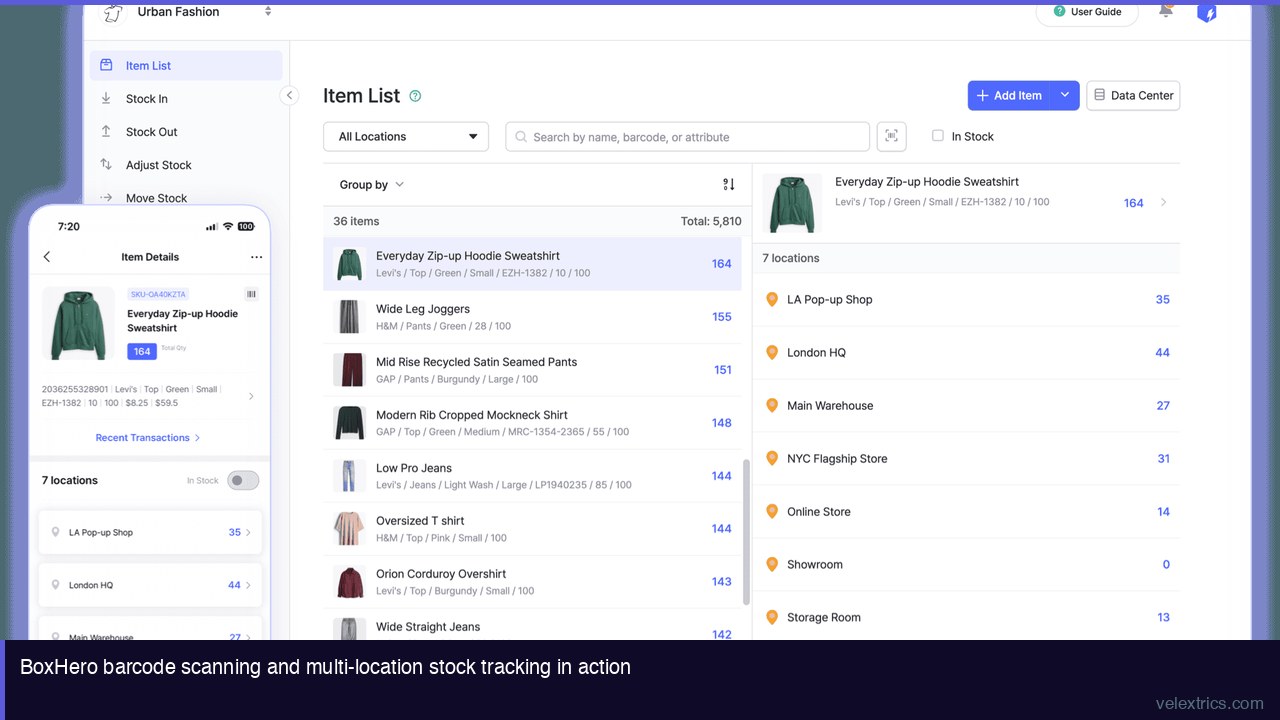
The barcode scanning feature is the difference between an inventory system that gets used and one that doesn’t. Manual entry is where accuracy goes wrong: typos, skipped items, rounded quantities. BoxHero’s mobile app turns a smartphone camera into a barcode scanner – scan an item, enter the quantity, done.
For receiving shipments, this means walking through a delivery with a phone and scanning each item rather than writing on paper and entering it later. For stock counts, it means scanning through shelves rather than manually recording every SKU. The time saving per transaction is small; across hundreds of transactions per week, it’s significant.
The app supports both smartphone camera scanning and Bluetooth-connected barcode scanners for businesses with higher scan volume.
Item Management
Each item in BoxHero is a record with a SKU, barcode, custom attributes (color, size, brand, material – whatever’s relevant to the business), category, and location. Custom attributes are the feature that makes BoxHero adaptable across industries: a clothing retailer tracks size and color; a construction business tracks project and job site; a food business tracks batch and expiry.
Excel import handles migration from spreadsheet inventory – the common starting point for small businesses moving to dedicated software.
Multi-Location Inventory
The Business plan supports up to 3 locations, with add-ons for additional locations at $10/10 locations per month. Multi-location inventory tracks stock separately per location and records transfers between locations – which is how you know that the item isn’t out of stock, it’s at the other store.
For a business with a retail location, a back stockroom, and a warehouse, three locations is sufficient without add-ons.
Transaction History
Every movement is recorded: received, sold, transferred, adjusted, counted. Unlimited transaction history on the Business plan means the record goes back to day one. This is the audit trail that answers “why is the count wrong” – usually a transfer that wasn’t recorded, a return that wasn’t counted, or a discrepancy that’s been accumulating.
The 30-day limit on the Personal (free) plan is a real constraint for businesses that need to investigate older discrepancies.
Reporting
BoxHero’s reporting covers stock levels by date and location, transaction summaries, custom metrics, and inventory count audit results. The standard reports answer the common questions: what’s moving, what’s sitting, what’s below safety stock.
Custom reports address more specific needs without requiring custom development – you define the fields and filters.
Low Stock Alerts
Safety stock quantities set per item trigger notifications when levels fall below the threshold. This is the feature that shifts inventory from reactive (order when you run out) to proactive (order before you run out). The business value is avoiding stockouts – and the cost of stockouts (lost sales, emergency ordering, customer disappointment) is generally much higher than the cost of carrying a little extra safety stock.
→ Start Free with BoxHero – No Credit Card Required
Ease of Use
BoxHero’s stated goal is that basics are learnable in minutes. In practice, item import from Excel takes most users an hour the first time; the learning curve is front-loaded and relatively flat afterward.
The interface is web-based with a mobile app for on-the-go scanning and updates. The web interface handles setup, reporting, and order management; the mobile app is optimized for scanning and quick transaction entry.
Staff onboarding is typically faster than with more complex systems because the core workflow (scan, enter quantity, confirm) doesn’t require much instruction.
Pricing
| Plan | Price | Members | Items | Locations |
|---|---|---|---|---|
| Personal | Free | 1 | 100 | 1 |
| Business | $24/mo | 3 | 1,000 | 3 |
| Add members | +$5/mo each | – | – | – |
| Add items | +$10/mo per 1,000 | – | – | – |
| Add locations | +$10/mo per 10 | – | – | – |
Annual billing on the Business plan saves 20% ($288/year vs. $288 at monthly rate, effectively 2 months free).
At $24/month, BoxHero is the lowest-priced full-featured option in its category. Sortly’s comparable plan starts higher; inFlow’s entry price is 3-4x higher. For businesses where inventory management is a support function rather than a primary revenue driver, the price point is the right fit.
The free Personal plan is genuinely useful for the smallest operations – a solo operator with under 100 items can run full inventory management at no cost.
BoxHero vs. Competitors
| Product | Price | Items (base) | Locations | Barcode Scan | Mobile |
|---|---|---|---|---|---|
| BoxHero Business | $24/mo | 1,000 | 3 | Yes | iOS/Android |
| Sortly Advanced | ~$49/mo | 2,000 | Unlimited | Yes | iOS/Android |
| inFlow Standard | ~$89/mo | Unlimited | 2 | Yes | iOS/Android |
| Zoho Inventory Standard | $29/mo | 1,500 | 2 | Yes | iOS/Android |
BoxHero’s price is the lowest in the feature-comparable range. Zoho Inventory at $29/month is the closest competitor by price; it offers more items but tighter location limits at base tier and is more complex to set up for users not already in the Zoho ecosystem.
Who BoxHero Is Right For
Small retailers: Multi-location support, barcode scanning for receiving and stock counts, low stock alerts for reordering.
E-commerce businesses: SKU tracking, Excel import/export for channel reconciliation, API for integration with selling platforms.
Service businesses with physical supplies: Construction, trades, healthcare – track tools, materials, and supplies without enterprise complexity.
Businesses transitioning from spreadsheets: Excel import makes migration straightforward; the feature set is immediately more capable than spreadsheets without overwhelming.
Solo operators or small teams: The free Personal plan and low Business plan price match the scale of the business.
Limitations
Item cap at base tier: 1,000 items on the Business plan is sufficient for many small businesses but not all. Businesses with large SKU counts need to budget for add-ons or evaluate higher-capacity alternatives.
No native POS: BoxHero tracks inventory; it doesn’t process customer-facing sales transactions. Businesses that need POS at the point of sale need a separate system or integration.
Order management is basic: Purchase orders and sales orders are included but less developed than dedicated order management systems. For businesses where order workflow complexity is high, more specialized software may be needed.
Verdict
BoxHero delivers on the small business inventory management brief: real-time stock visibility, barcode scanning that actually speeds up work, multi-location support, reporting that informs decisions, and pricing that makes sense for the scale.
At $24/month, it’s the most accessible full-featured inventory management option available. For small businesses currently on spreadsheets, the switch pays back in reduced errors and time savings well within the first month of use.
→ Try BoxHero Free for 30 Days
Frequently Asked Questions
Is BoxHero free?
BoxHero has a permanently free Personal plan for 1 user, 100 items, and 1 location. The Business plan at $24/month adds multi-user, multi-location, and higher item counts with a 30-day free trial (no credit card required).
Does BoxHero work on mobile?
Yes. iOS and Android apps with offline functionality. Barcode scanning uses the smartphone camera.
Can BoxHero handle product variants?
Yes. Custom attributes (size, color, material, etc.) allow variant tracking per item. Each variant can have its own barcode and stock level.
How does BoxHero handle multiple warehouses?
Up to 3 locations on the Business plan, with add-ons for more. Each location has independent stock levels; transfers between locations are recorded as transactions.
Is BoxHero suitable for food businesses?
Yes. Custom attributes can include batch numbers and expiry dates. BoxHero is used in food service and hospitality contexts. Note that it doesn’t have purpose-built food safety or FIFO-enforcement features; those need to be managed as part of the usage process rather than being system-enforced.