Running inventory on spreadsheets works until it doesn’t. It stops working when the spreadsheet isn’t updated because updating it takes too long. It stops working when two people update it simultaneously and one version overwrites the other. It stops working when you need to know current stock at 9pm on a Saturday and can’t remember which version is current.
The best inventory management software for small business in 2026 solves these problems without introducing the complexity and cost of enterprise systems that are built for operations ten times larger. The right tool is one that staff actually use because it’s fast enough not to feel like extra work, accurate enough to be trusted, and priced appropriately for a business that isn’t a corporation.
This guide covers what to look for, how the leading options compare, and why the category is dominated by a few tools that got the simplicity-to-power ratio right.
Disclosure: this article contains affiliate links. We may earn a commission if you buy through our links, at no extra cost to you.
Why Small Businesses Need Dedicated Inventory Software
The cost of poor inventory management is real and measurable: overstock that ties up cash, stockouts that lose sales, time spent on manual counts, mistakes that create customer service problems.
Dedicated inventory software addresses these through:
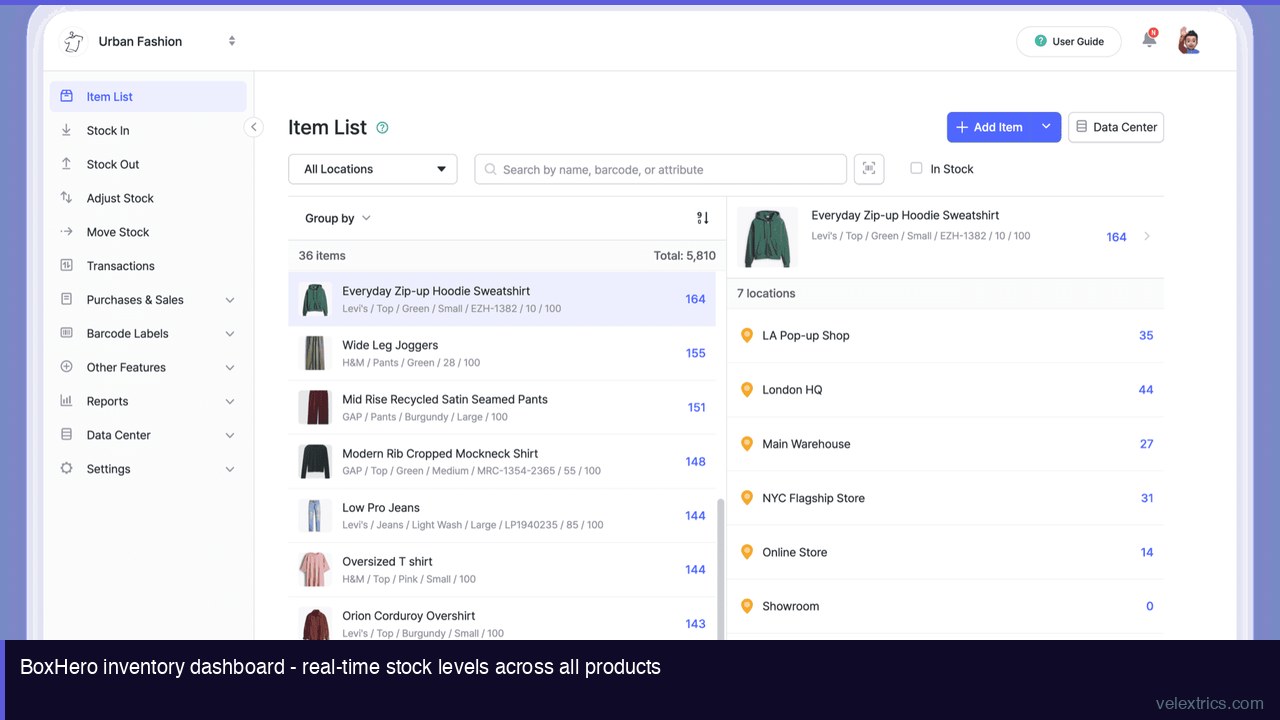
Real-time visibility: Current stock levels visible to anyone who needs them, from anywhere, updated as transactions happen rather than at the end of the day or week.
Transaction tracking: Every movement recorded – received, sold, transferred, adjusted – so you can trace why levels changed, not just that they changed.
Low stock alerts: Notification when items fall below safety stock levels, before they run out rather than after.
Barcode scanning: Fast, accurate updates that eliminate manual entry errors and make stock-taking quick enough that it actually happens.
For businesses managing physical products – retail, e-commerce, food service, construction, manufacturing, healthcare supplies – these aren’t optional features. They’re the basic infrastructure that makes accurate inventory possible.
What to Look for in Small Business Inventory Software
Ease of Use
Enterprise inventory systems are built for dedicated warehouse staff with training time. Small business software needs to be learnable in hours and fast enough that the owner, a part-time employee, or a retail assistant can update inventory accurately without it becoming a full-time job.
Look for: intuitive item setup, mobile barcode scanning, minimal clicks per transaction.
Barcode Scanning
Manual entry is where inventory accuracy breaks down. Barcode scanning – using a smartphone camera or a connected scanner – eliminates the typos and skipped entries that accumulate into inaccurate records.
The practical test: can a staff member receive a shipment of 50 items in 10 minutes using the app? If the answer is no, the app won’t be used consistently.
Multi-Location Support
Retail businesses with more than one location, businesses with separate storage, or operations with both a main location and satellite storage all need inventory that tracks where stock is, not just how much exists.
Reporting
Historical data is what makes inventory management a decision-making tool rather than just a record. Reports that show what moved when, what’s been sitting too long, and what the trends are for specific items allow buying decisions based on data rather than gut feel.
Pricing Appropriate to Scale
Enterprise inventory systems cost $100-500+/month. For a small business managing under a thousand SKUs, those price points don’t make sense. The right pricing tier provides the features needed without charging for capability that won’t be used.
Best Inventory Management Software for Small Business 2026: Top Options
BoxHero ($0-$24/month) – Best Overall for Small Business
BoxHero is cloud-based inventory management built specifically for small businesses – the stated simplicity goal is that basics are learnable in minutes, not days. With 300,000+ users across 15 industries including retail, e-commerce, fashion, construction, and food service, it covers the range of product types and business models small businesses actually have.
Free plan (Personal): 1 user, 100 items, 1 location, 30-day transaction history. Appropriate for the smallest operations or for evaluating whether the software fits.
Business plan ($24/month, up to 3 members): 1,000 items, 3 locations, unlimited transaction history, low stock alerts, custom reports, barcode printing, order management, product bundles, and multi-user collaboration.
The $24/month price point is the lowest among full-featured inventory systems, including options from Sortly, inFlow, and Zoho Inventory.
Key features: barcode scanning via smartphone or dedicated scanner, Excel import/export, real-time updates across devices, mobile app (iOS and Android), offline functionality, custom attributes (size, color, brand), API access.
→ Try BoxHero Free – No Credit Card Required
Sortly (~$29-$99/month) – Best for Visual Inventory
Sortly emphasizes visual organization – each item has a photo, making identification fast for teams that deal with many similar-looking items. Strong in construction and property management where visual identification matters more than barcode scanning speed. Higher price floor than BoxHero for comparable feature sets.
inFlow (~$89-$219/month) – Best for Order-Heavy Businesses
inFlow is built around purchase order and sales order workflows, making it strong for businesses where order management is as important as stock tracking. Significantly more expensive than BoxHero; appropriate for businesses that need the order workflow investment.
Zoho Inventory (~$0-$99/month) – Best if Already Using Zoho
Zoho Inventory integrates tightly with Zoho CRM, Zoho Books, and other Zoho products. If a business is already in the Zoho ecosystem, Inventory adds without duplication. As a standalone product, its interface is more complex than BoxHero for basic inventory tasks.
BoxHero vs. Spreadsheets: The Honest Case
| Factor | BoxHero | Spreadsheet |
|---|---|---|
| Real-time updates | Yes – syncs immediately | Manual save + share |
| Multi-user access | Concurrent, tracked | Version conflicts |
| Barcode scanning | Built-in mobile scan | Manual entry |
| Transaction history | Automatic, unlimited | Manual, easily lost |
| Low stock alerts | Automatic notifications | Manual monitoring |
| Mobile access | Full-featured app | Awkward on mobile |
| Cost | $0-$24/month | Free |
The cost of spreadsheets isn’t the monthly subscription – it’s the time spent on manual updates, the errors from manual entry, and the stockouts and overstock that happen because the data isn’t current or reliable. For most small businesses with physical inventory, the math strongly favors even a $24/month inventory system over continued spreadsheet use.
Industries Where Small Business Inventory Software Matters Most
Retail (single location or multi-location): Stock accuracy directly affects customer satisfaction and shrinkage management. Barcode scanning for receiving and sales reconciliation.
E-commerce: Multi-channel selling creates inventory sync problems across platforms. Inventory software that tracks by SKU across channels prevents overselling.
Food service and hospitality: Ingredient and supply tracking, receiving verification, usage reporting.
Construction and trades: Tool and equipment tracking, material quantities per job, theft prevention.
Fashion and apparel: Size/color variants, seasonal stock management, end-of-season clearance identification.
Healthcare and beauty: Expiry date tracking, controlled substance logging, reorder point management.
Frequently Asked Questions
What’s the difference between inventory management and point-of-sale software?
POS software processes transactions at the time of sale. Inventory management tracks what you have, where it is, and what’s moved. Many businesses need both; some inventory systems (including BoxHero) include basic sales recording; dedicated POS software typically has more sales-side features and integrates with inventory.
Does BoxHero work offline?
Yes. BoxHero’s mobile app includes offline functionality – transactions recorded without connectivity sync when the connection is restored. This is important for warehouse and stockroom environments without consistent Wi-Fi.
How many SKUs can BoxHero handle?
The Business plan supports 1,000 items, with add-ons available at $10/1,000 additional items per month. For businesses with item counts exceeding a few thousand, verify that the total cost remains appropriate as items are added.
Can I import existing inventory from Excel?
Yes. BoxHero supports Excel import, which is the standard starting point for businesses migrating from spreadsheet inventory.
Does BoxHero integrate with e-commerce platforms?
BoxHero provides API access and integrations. Check current integration availability on their site, as connectivity with specific platforms (Shopify, WooCommerce, etc.) may require API setup or third-party connectors.